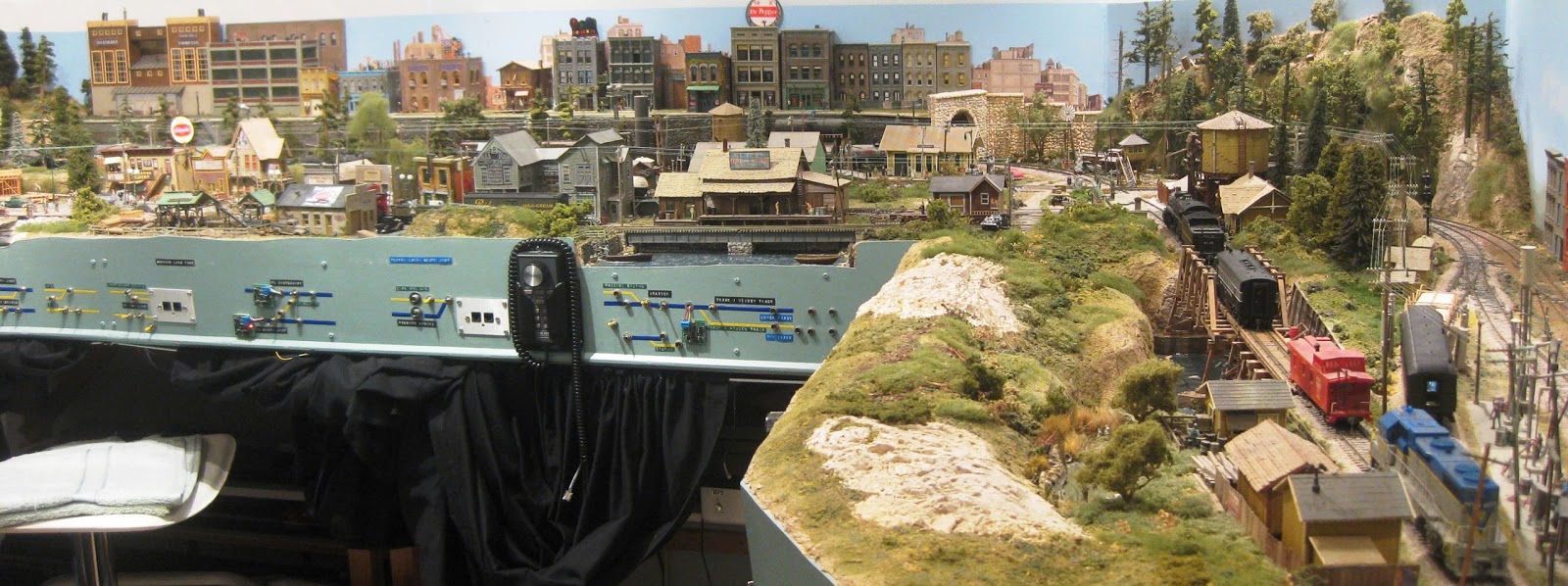
Above is my Gosford complete with the Overhead. Click on the photo to see the Main North Album at Flickr

Friday, February 5, 2016

Linton’s Loksounds.


Last night I had the pleasure of Linton Towelly visiting the Main North, demonstrating his Brass Z13 and the Auscision XPT, equipped with Loksound decoders.

I have been following Linton’s Blog http://stonequarrycreek.blogspot.com.au/ where he has been discussing his sound projects for his some of his locos complete with YouTube videos, to get what he considers a better operating loco sound. Tonight I saw two of his projects “running” on the Main North – in a word WOW!!!!

See Linton's Blog entries about the Z13 and the XPT including the YouTube videos, at:
http://stonequarrycreek.blogspot.com.au/2016/01/a-revamped-z13-most-of-house-and.html

As you know. I’m predominately a steam loco operator, I was gob smacked when he ran the Z13 from Werris Creek to Broadmeadow. There has been some construction on the layout lately (installing Armidale Staging and now Hawkesbury River Station – a future Blog entry), so there was some dirt around. The 4-4-2T 13 Class ran on the on the layout without missing a beat.

I have done hundreds of decoder installations, what amazed me with Linton’s Z13 “installation”, it had 2 crew and I could see through the Cab. Not a “big” thing I hear you saying, but where’s the decoder, speaker and the TCS KA2 installed? There's NO Tender on the 13 Class. 

The Zimo Sugar Cube is located in a home made lead “casting” in the Smokebox. The Loksound Micro is somewhere, I think he said on the floor behind the driver. He did “split up” the KA2 where 4 capacitors of the KA2 were under the Coal Load and the fifth is up the front of the loco. I thought I did well, getting my 30 Tank equipped but I have to redo it and add crew, now I have seen Linton's Z13.

What a fantastic “installation”.

Running the loco, the sounds were just as amazing as the installation – fantastic.

Stationary, the 13 had all the appropriate sounds and more. Accelerating the loco, the Chuffs were loud until the loco was slowed by “one” Speed Step (using 28 Speed Step mode), where the Chuff volume reduced. Increase the Speed by “one” Speed Step, the loco Chuff volume increased. Reducing the speed to slow down approaching a Station, the Chuffs were very quiet, simulating coasting. To stop at the Station, F6 is pressed to operate the Brake. Great to see the Brake on F6 so we NCE users can see that the Brake is ON. Very impressive, so much so that I thinking of operating with "Brakes", in the future.

Linton explained that he was not happy with the way standard Diesel decoders operated, as he had driven the real thing. He wanted his Diesels to sound more like what he had experienced. In endeavoring to achieve this, Linton posted a message on the Loksound Yahoo group. I saw the replies at the time and they were less than complimentary, so he soldiered on without "their" help.

There are two Loksound decoders installed in the XPT, both operating on the same address (not consisted). On power up, the “rear” Power Car notched up (to level 2). This effect is due to one (either the front or rear), continually supplying the electrics for the XPT when stationary.

Countless hours mucking around with his recordings, the Audacity software and the Loksound Programmer, Linton was able to achieve his desired “notching” effect.  Some might say to use Manual Notching but if you have used this feature, I understand why Linton worked so hard here.

I wish I had time to take some videos but it was already the wee hours of the morning but I took a photo of the XPT as shown below. 


One of the great things about this Hobby, it has so many different disciplines. 

What Linton has done with these Loksounds, is nothing short of AMAZING. 

Linton, thanks for the visit.   

Sunday, January 3, 2016

Operating Cards for the Main North in 1965.

Visitors to the Main North can bring their own trains to run on the layout. Return Loops at either end providing a continuous run of 115 Metres of track, gives the Visitor an extensive road test/running of their trains and they have fun.

The 12 Stations/Locations are identified on the appropriate fascia. To help Operators know where they are, which way to go etc, I have attached some Track Plans shown below, to the layout's Valances. 

Operators at a Main North Operating Session or a Visitor that wants wants to run one of my trains, they'll have to run them as they did in 1965 with all the operations of engine changes, double heading/banking, add/remove wagons/coaches/vans etc, that were done to run the train in both directions over this 450 km section on my Main North. This includes changing over to  46 Class Electric for all southbound trains (except the 44 hauled North Coast trains), at Gosford, for the run to Sydney. The same for northbound trains out of Sydney, all will be hauled by a 46 to Gosford, where there will be an engine change to a 35s, 36s, 38s or an AD60s, heading north. 


To know what has to be done to operate "the" train, I make a Business Card sized "Operating Card", with the necessary details and attach them to Clips similar to these,  to all of my Throttles, shown left,   
The Operating Card is printed (described below) on normal paper and laminated using 64 x 99 mm Laminating Pouches available from Office Suppliers, to make it stiff and easy to slide into the Clip. 

Using the many books and magazines I have collected about the NSWGR, Passenger Train Composition Book, Load Tables, Wagon Load Calculator, help from other NSW modellers etc, I was able to put together the details of running each of my trains, "1965 style". 


At the moment, I don’t operate to a Timetable, instead I want everyone to have fun playing trains, using the Operating Card. If and when a Timetable is implemented, each Operator will still need to use the Operating Card to run a train.   

For 1965 Operating Sessions the Operator takes an Operating Card from the Card Stowage "Trains to Run" Pocket (lower) located above the Workbench (shown right) and clips it to the Throttle. Using the Card, he'll run the train "1965 style" and when finished, returns the Card to the "Finished Trains" Pocket.
The Operating Cards are arranged in a sequence that provides an Operating Session without too many bottlenecks etc.  
Note: My DCC Ammeter is shown in the fascia above the Workbench, monitoring the current to the layout. The reading of "1.12" Amps is what 33 stationary sound equipped locos, ALL quiet (no sounds), are drawing. This equates to 34 mAs each. With 6 Operators playing trains, the Ammeter displays rarely reads higher than 2.0 Amps. I recommend that ALL DCC layouts have an Ammeter installed. See my Meters for DCC web page for more details. 

Operating Sound Locos.
Imagine the noise of over 30 sound locos starting up, when the layout is powered up, what a racket, so ALL locos are programmed to be QUIET until they are operated.
75% of my locos (Soundtraxx and QSI equipped ones), will automatically mute after a time of inactivity, minimizing the "idling" locos, after the Operator has finished running the train, and they forget to mute the loco (F8). 

Making the Operating Cards.
Using M/S Word, a page is divided into two columns, the width adjusted to the width of the business card as shown below. I wrote the details on how to "operate' each of my staged trains.


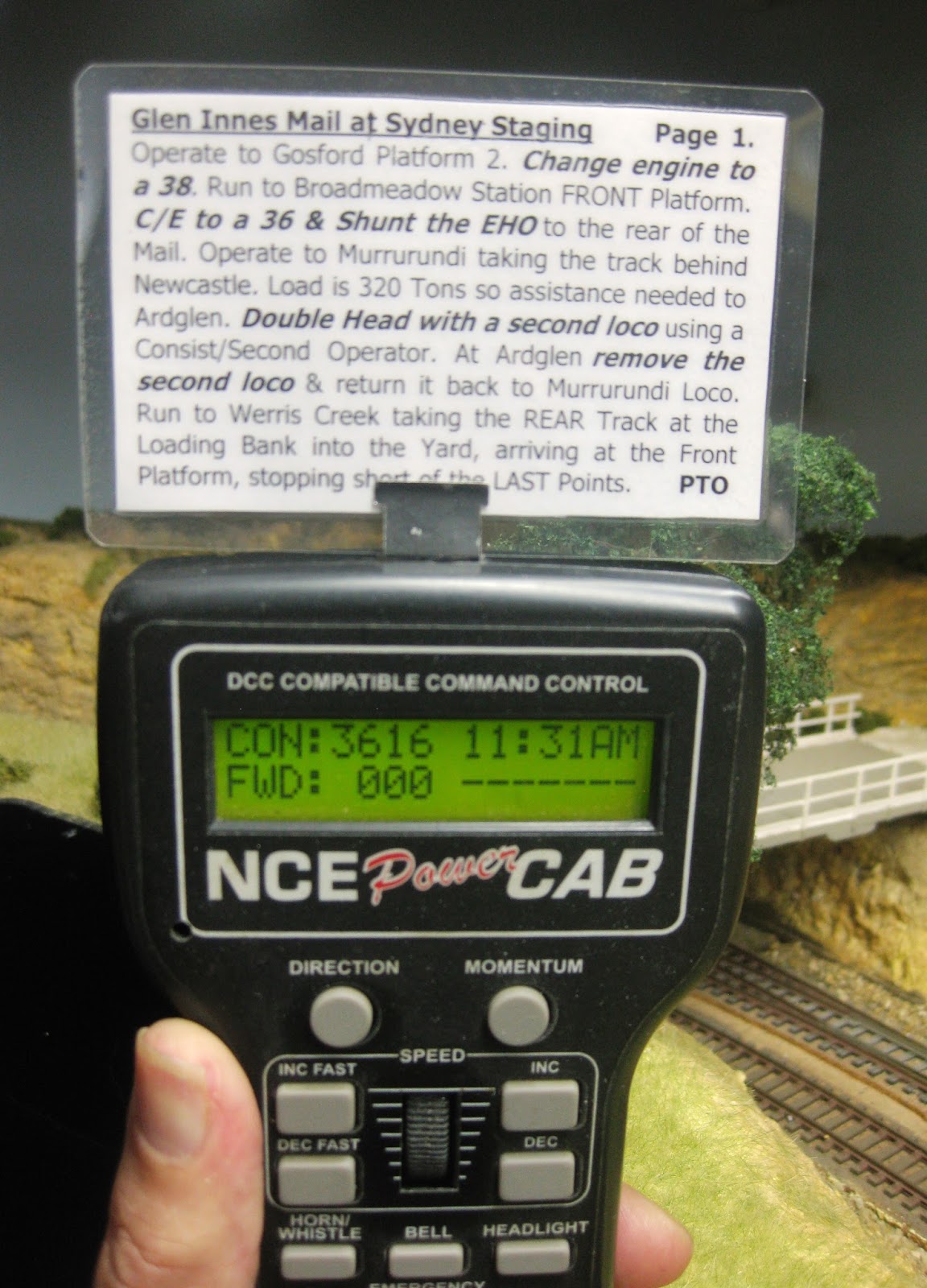
If the text was more than 12 lines, I made a second page, placing the text in the appropriate place to provide text on both the front and back of the Operating Card, when printed as shown on the Glen Innes Mail Operating Card below. I have used Tahoma font with "10" size, providing easy to read text, even without my Reading Glasses.   
The highlighted text, in the Glen Innes Mail's Operating Card indicates there are 12 "operations" to be carried out while operating this train from Sydney Staging to Tamworth and back to Sydney. Obviously not all trains travel this far and don't have this many "operations". I use normal A4 paper not cardboard due to laminating the Card.


A YouTube video of operating the Glen Innes Mail with it's Engine Changes etc. as explained in the above Operating Card, can be seen below:


As I operate in 1965, steam locos were still the primary form of traction on the Main North, north of Gosford. The tonnage of the loads were calculated for the Ruling Grade for that section. Using the appropriate Load Tables and a Wagon Load Calculator, I “weighed” my trains to keep them within the Load Table specification. I did a Presentation on this topic at the 2015 Epping Seminar. Click here for the Presentation.

A few trains like the "269 Pick Up" have shunting activities but there is more than enough shunting necessary with the Newstan Full and Empty Coal Trains, the W44 Concentrate, the Full and Empty Wheat trains, the Illawarra Coke train etc. The addition of the engine "operations" makes for an even more complex running exercise for most trains that takes a long time to complete and is lots of fun. 

Many trains are "through" trains. Depending on the trains, it can take up to 60 minutes to run a train. Imagine how tired an Operator can get after walking up to 450 kms (or 900 kms if he returns), as he follows his train, changing engine etc. A “Crib” break can be taken anytime, just leave the train in an appropriate Loop/Siding so as to not block the main line. If you need someone to have a chat with, turn of the Master Power Switch and announce “Coffee” but be aware of calls like "what's happened, my loco has stopped" etc.

Layouts need plenty of Staging Areas to store the trains, complete with loco. I have 3, soon 4 Staging Areas, to store my trains. 

To see one of my favourite "operations" that has to be done on many DOWN Goods trains as they are run to Werris Creek, including rear end banking up to Ardglen, click on the below video.


Tuesday, December 29, 2015

Layout Changes.

On my Main North layout, the "Main North Line" terminated at Armidale Staging a few feet north of Werris Creek Station and on the "wrong" side of the Station. The Mungindi Branch line crosses the Lift Up Bridge through to Gunnedah and then through a Return Loop, providing easy turning of a train and continuous running if necessary.

Recently I "fine tuned" and "electrified" the Points at Gunnedah's Black Jack Coal Mine located opposite Gunnedah and on a shelf 80 mm above the track, south of Werris Creek Yard. With the Gunnedah Abattoir and the Mine it provided some great train operations.

I had made some changes at Werris Creek to improve operations that included repositioning the Roundhouse and Turntable, adding the Shunting Neck and adding a second line into the Yard for the "main line", providing a more direct path to the Station. This eliminated a Crossover that was giving me some grief (Shinohara Double Curves - what a pain in the proverbial).

I wanted to add a Stock Yard and Loading Bank for additional operations around Werris Creek but there was no room to do it unless I removed Gunnedah's Black Jack Coal Mine. A monumental decision had to be made as Gunnedah was an important part of my layout.

Due to the "people traffic" in the Aisle between Sulphide Junction and Broadmeadow, I had removed the 300 mm high Platform that was necessary to operate Gunnedah so there was not much happening at the Black Jack Coal Mine so Gunnedah had become a "through" station as North West trains used the Return Loop to turn around trains.

Layouts "evolve", so I removed the Mine and the associated track along with the Abattoirs and now I had room for the Loading Bank and Stock Yards. These could be operated from the Train Room, see below. I have included the Werris Creek Mine (seen in the background of the above photo), so LCH Coal Trains will be running from/to Werris Creek.


With these above changes the 3 "signature" Main North Passenger Trains - the Brisbane Express via Wallangarra, the Glen Innes Mail and the 4 Car DEB Set Northern Tablelands Express that I've now got all the correct rolling stock for (mentioned last post), would STILL be terminated at Armidale Staging, 3 feet away from Werris Creek Station.

The "importance" of Gunnedah without the Mine and Abattoir was drastically reduced. To provide a 25 foot longer "Main North"and the Return Loop for these 3 Passenger Trains etc, I've swapped around the two sections of track "north" of Werris Creek, see the Track Plan below.


The below photo shows the Glen Innes Mail having arrived on the "correct" side of the Station, departing and continuing on the additional 25 foot section of the Main North line (previously the Mungindi Branch), heading across the Lift Up Bridge to West Tamworth.


Gunnedah Station/Yard with the Mill and Silo will now be my "close enough" combined West Tamworth/Tamworth and the previous Armidale Staging (3 feet from Werris Creek) will now be the North West Staging. A new Armidale Staging above Newcastle (Middle Deck), will be added later.


Shown above is one of the signature Passenger Trains of the Main North, the 3616 hauled Glen Innes Mail, double headed to "light engine" 3390 to West Tamworth for the Barraba Passenger. Operating Trains on the Main North and the The Glen Innes Mail, are the topic for my next Blog entry.

Tuesday, December 15, 2015

Passenger Trains for the Main North.

Over the years of building the Main North I have mainly concentrated on Goods trains with just a few Passenger trains, namely the:
  • 3801 hauled Newcastle Flyer HUB Cars,
  • 3076 hauled Toronto Passenger FOs, 
  • An 8 Car Interurban U Boats - Syd/Gos/Syd.
  • A Northern Tablelands Express using a RUB Set until I get a DEB Set.
For years I've been collecting all manner of stuff that's required when building a layout and storing it under the layout with a hope of using it some time later, just like "normal" model railroaders. The Main North is a "mainline" layout so I really needed to make up some more passenger trains, including some "Mails".Those Lima 12 wheelers, Austrains and Powerline passenger coaches under the layout, are now going to see the light.

The chance of purchasing some rolling stock in the dismantling of Keith's layout (mentioned on a previous Blog entry), I once again forgot about passenger trains and only purchased goods wagons.

Using the NSWGR Train Composition and Marshalling Book, I made a list of the extra Passenger trains that ran in 1965 on the Main North, listed below. I needed quite a few pieces of rolling stock marked in bold and italics.
  • Brisbane Express via Wallangarra.- HKL (at WCK) MHO BS TAM FS FS EHO,
  • North West Mail - EHO MHO KP CS TAM FS.
  • Glen Innes Mail - ACS CR MHO MHO TAM BS FS EHO.
  • North Coast Daylight Express - RUB Set.
  • North Coast Mail - MLV MHO MHO KP FS TAM BS.
  • All stops Newcastle/Gosford/Newcastle Passenger trains - 4 and 6 FOs.
I contacted Bob Stack as I knew he was selling his NSW rolling stock. Bob came to the rescue with all but two coaches for the Glen Innes Mail  (ACS and CR). I made a few "substitutions" namely LHOs for EHOs and a Elliptical High Roof Mail Van for the HKL. 

The Epping Club Market Day would provide an opportunity of getting the two missing coaches but I'd decided I'd go with what I had. Well that statement only lasted a few days when a mate rang me and said there was a CR on Ebay and the auction ends in 4 hours. I was not a member of Ebay or Paypal, I joined the Ebay and I made a couple of bids on the CR. I won it. On delivery I was pleasantly surprised that the CR looked better in the flesh than in the photo. My nearly correct Glen Innes Mail is shown below.


I went to the Market Day to catch up with a few mates and had a look at what's for sale. Charlie from Canberra had a "ACS" decaled Lima MBE. Essentially I paid $20 for an ACS decal because I now have a spare MBE. I now have a "correct" Glen Innes Mail.

While talking to Allan Garbutt who was helping on Phil Collins' table, Allan showed me a box and said I badly needed "these" on the Main North. I looked at the label on the box and said "No way it's a kit!!!" I'm a Plonker now and time I spend on my hobby needs to be on the building/scenecing the Main North. Allan opened the box and said: "It won't take too much time to finish them as they're all painted and you desperately need a DEB Set Northern Tablelands Express, make Phil an offer". With a pause from Phil, I was now an owner of a 4 Car DEB Set.

I installed a Diesel Econami decoder, selecting the EMD 567 Non Turbo Prime Mover sound that'll provide a "close enough" sound for the DEB Set. I needed to power the second Power Car's motor. I thought of adding a motor only decoder for this but thought locos always need extra pick ups. I decided to run a 6 conductor harness through the 4 Cars - two wires to connect all the bogie pick ups, two wires to power the second motor and two wires for the second speaker. With this harness, it's a real pain in the backside to handle this 4 Car Set but they can be separated if necessary.

When you get to be an old fart like me, it gets hard to read the small numbers on the side of these coaches, so I decided it's number would be 904 (900 for DEB Set and 4 for the 4 Car Set), also I was already thinking of having a 3 Car set - see below.

Operating the 4 Car Northern Tablelands Express from Sydney to Werris Ck and return, I now wanted to have the "real" thing, so I needed to find 3 extra cars. When the N/T Express arrived at Werris Creek, it split into two trains - 4 Cars to Glen Innes and 3 Cars to Moree. I also wanted to replicate this "operation" on my layout. I NEEDED a 3 Car DEB Set and luckily Lloyd Sawyer was able to fix me up.

The 3 Car DEB Set has only one motor. I installed a another Econami decoder into the "motored" Power Car. I used a SBS4DCC 15 x 11 x 8 mm Sugar Cube speaker that I'm fitting to all of my locos. Without the need for connecting a second motor, I thought I'd try the Power Car on the track. It kept cutting out/stalling due to a lack of pick ups and the fact that the Bowser Bogies have brass wheels. I installed a TCS KA2 (200,000 uF) Stay Alive and now it runs without stalling. If it stalls anymore I'll add another KA2 (in parallel). Adjusted the decoder's address to guess what - 903 for the same above reason.


I have finally (May 2016), fitted lights to the "end" Cars of the 7 Car Set, using LEDs and fibre optic cable. This provides the necessary lights from Werris Creek to Sydney and return but one end of the 4 Cars Set to Armidale won't have lights. A small price to pay for the huge saving in time installing the lights


Now with these extra Passenger trains, I need some more Staging Tracks. They will be easily added at Sydney (obviously) and some at the Northern End (Upper Deck) beyond Gunnedah that will be renamed to "West Tamworth" for reasons that'll be explained in my next Blog entry about running Passenger Trains on the Main North.

I was very conscious of operating a RUB Set Northern Tableland Express on my 1965 time period "Main North".

Thanks to some "arm twisting" from Allan and Lloyd and Phil's generosity, I can now sleep at nights knowing I am running the "right" train.


See the DEB Set operating up the the Liverpool Ranges between Pangela and Ardglen at:


Tuesday, July 14, 2015

How Lucky are we to have a Hobby.

I have been reminded again, how lucky we are to have a hobby.

John a DCC modeller asked me if I could fix an electrical problem on his layout the “Tupper Lake and South Junction” as I had previously repaired his DCC system.


John and his wife live in a Unit with his layout in the 10’ x 12’ spare bedroom. The layout is finished with many finely detailed buildings and all the scenery is done. John’s grandson is installing lights in all the buildings.  

John has had both of his legs amputated and has to use a Frame, luckily the layout was mostly completed. Not to be sidelined, he is mobile enough to keep up his modelling. The third Bedroom has the Computer and a large Workbench where John does most of his modelling these days.

John is a member of the NMRA and is working on the Achievement Program that will hopefully culminate in him being awarded an MMR - Master Model Railroader. When I visited, he is working on a “Track Module” where he has hand built Points and a Crossover. John has 4 out of the 7 AP Certificates necessary to be awarded the MMR.

John’s wife Wendy said to me, we are very lucky that John has his model trains, it has kept him sane, active and busy.

Wendy’s comments reminded me, those that have a hobby are very fortunate, more so for us that are retired, there is always something to do that keeps us active.

My recent Blog entry about dismantling Keith's layout and his model railway Journey over 40 plus years, reiterates how lucky are we to have a Hobby. Both John and Keith are 84 years "young" and I hope I am as active and as young as John and Keith are, when I'm 84.

John and Keith, you two modellers are INSPIRATIONAL.

Click on the Slideshow Icon at Flickr for a photo tour of both John's and Keith's layouts.

John's "Tupper Lake and South Junction"  

For a YouTube video of John's layout, taken in May 2017, click here.

Keith's NSW layout

Thank You, John and Keith.

John passed away on 23rd June 2017. I have lost an "Inspirational" Friend. I did not know John for long. His Eulogy provided me an insight to his life, a devoted family man that lived life to the fullest with his wife Wendy always at his side. John leaves us but not before reaching the pinnacle of this Hobby, becoming an NMRA Master Model Railroader. John, you are more than a "Master" to us. You'll be sadly missed but remembered forever. John - Rest In Peace. 

Keith passed away in August 2020 - Rest in Peace, Keith.

Saturday, July 4, 2015

Speedo Car for Speed Matching Locos.

The most popular post on my Blog is my "30 MPH Max Speed Matching of all of my Locos", done in July 2010 with reference to my web page for making a Speedo Car. I recently made a Speedo Car for another modeller and I took some photos. Using these photos and the associated text you can make a Speedo Car for about $30 using one of your existing pieces of rolling stock.
Having a Speedo Car makes "speed matching" locos really easy.

An alternative to making the Speedo Car, purchase a module like the Train Speed 1 from TCS. See Ken Patterson's "What's Neat" series video, showing how he installed his TCS Speedometer

Parts for the Speedo Car.
Bicycle Computer from any Bike Shop. The one below is from Ecowell.
Casula Hobbies K wagon or similar. I assembled one from a kit years ago.
Metal Wheel Set for the K: 23.8 mm long 10.5 mm diameter (36") - Steam Era Part No W4 or similar.Your Wagon may be different, please check.
Magnet . I used the Wand supplied with Eureka Models sound locos and trimmed it to 6.5 mm see text.


Notes in Red added on 3APR2019.
  1. Mount the Sensor over the R/H Axle as shown in the Top photo.
  2. Cut Two Slots in the Sides of the K Wagon as shown.
  3. Carefully trim the Sensor's length with the Dremel as shown to eliminate too much overhang.
  4. Trim the sides of the Sensor.
  5. Drill a hole in the side of the Wagon to route the Sensor wiring back into the Wagon.
  6. I used a "square" Bike Computer as shown. Nov 2021, I used a $49 Ecowell BC10. 
  7. If necessary cut a Slot in the Floor for the Bike Computer's Clip, so it sits rigidly, see below.
  8. I used a K and M Axle with 10.3 mm Wheels and ground a "flat" on the Axle to easily secure the Magnet, see below.
  9. Using your Dremel, trim the Wand Magnet to 6.5 mm. DO NOT make it any longer. I made a 10.0 mm Magnet from a Wand and it DID NOT work with the Echowell BRI 8.
  10. Glue the Magnet to the Axle with 5 Minute Araldite and fit Axle to the Wagon.
  11. Trim the Sensor wiring for a neat fit.
  12. Before joining the wires, you have to CHECK the magnet/Sensor operation. Easier now.
  13. Connect the Sensor to a Multimeter, SET to OHMs.
  14. With the magnet "away" from the Floor, the Meter should show infinity (Open circuit).
  15. Rotate the Axle so the Magnet is CLOSE to the Floor, the Meter should show ZERO (short circuit).
  16. If the Sensor shows SHORT all the time, the Sensor will have to be RAISED above the floor.
  17. If the Sensor shows OPEN (infinity) all the time, the Sensor will have to LOWERED. Grind away the face of the Sensor and/or the floor.
  18. When the Sensor shows ZERO Ohms ONCE (close to the floor) in 360 degrees of Axle rotation, the Sensor and Magnet are set up correctly.
  19. Fit some 3.0 mm heat shrink to the two wires.
  20. Solder the connections then shrink the heat shrink. Note: The Echowell BRI 8 wiring is difficult to solder. The strands of the multi strand wire are covered with insulation. Use your Soldering Iron turned up to 450 degC to melt the insulation. Use the normal Temp setting to solder the wires together. 


Adjusting the Bicycle Computer for correct operation.

For the Bike Computer arrangement, the unit will need to be programmed with a "multiplier" determined by the diameter of the Wheel to provide a "one pulse" per revolution signal. Counting these pulses over time time, the Computer displays KPH/MPH.

Since we modellers want scale KPH/MPH for our scenario and the Wheel of the K Wagon is a "scale" 36 inches in diameter, we use the SAME "Multiplier", as above.

Using the Instructions, you'll find a value close to the one I used in my original Speedo Car and what I programmed into my new Speedo Car. That is 2873. For my Ecowell BC10, I again used "2873"  Check your individual Bike Computer Manual.

You need to program your bike computer with is "2873".

To check your calibration:
  1. "Mark" 3 feet of straight track on your layout.
  2. Operate a loco at 10 MPH as indicated on the Speedo Car
  3. Using this 36 inch "Speed Trap", time the loco.
  4. It should take 18 seconds.
  5. If shorter/longer then you may need to change the "Multiplier".
  6. Don't be too pedantic here - close enough is good enough.
For a good Speed Calculator see:

Scale Speed Calculator

From the above, hopefully everything has worked out okay and you're ready to "Speed Match" your locos.

While I use 30 MPH for my maximum speed you can use what ever speed you desire.


Sunday, June 28, 2015

Missing on the June Long Weekend Exhibition.

Normally I look forward the Epping Club's Exhibition on the June Long Weekend, always a great show but this year I was asked if I'd like to accompany my Son Matt on a 4WD crossing of the Simpson Desert with 7 other 4WDs.

This opportunity does not come often especially if you don't own a 4WD. I read and was told, crossing the Simpson Desert should be one thing on your "Bucket List". After doing the "crossing", I agree. There's always next year for the exhibition but a once in a lifetime experience spending two weeks with my Son, so it was off to the Simpson Desert instead of "trains". What a BIG call.

Even bigger kms to get there - 2,400 kms to Dalhouise Springs S.A. via Mildura Vic, Port Augusta S.A and Kulgera N.T. and 2,100 kms from Birdsville QLD via Bourke, home. We did the easier "easterly" 500 km crossing of the Simpson Desert - all sand and lots of Sand Dunes and took 5 days so the other 4,500 kms, took 5 days. I was pulled over at 3.30 AM at Coober Pedy S.A. in the pouring rain, and breath tested. They are dedicated police in S.A. Going the other way, I only passed 2 trucks (road trains) and a car in 6 hours on the Stuart Hwy.

How can I add this desert experience to my layout? It seems too good an opportunity to add something personal to my layout. We crossed both the old (replaced in 1980) and the new Ghan Railways, some 2,000 plus kms from Gunnedah, the furthest north west location on my Main North but with some "selective compression", I'll add the Simpson Desert, well the highest Sand Dune "Big Red" (35 metres), to my North West Staging. I bought some sand back from "Big Red", just west of Birdsville. One day soon you may see a Sand Dune and some 4WDs on the Main North.

A fantastic experience but only possible if you own or can be a passenger in a 4WD. If you are interested in seeing some photos and a 30 second video climbing "Big Red" see:

https://www.flickr.com/photos/131887990@N06/sets/72157654377670051

Now back to playing trains.

Yesterday I ran my 4803 a latest Powerline 48 equipped with what I consider the best diesel sound - Loksound 244, to get back into trains. It kept cutting out even though it had a TCS KA2 Keep Alive. Last night I dismantled the bogies and cleaned out all the black crud around the axles/bearings and it again runs great. So if your latest Powerline 48 runs like crap, dismantle the bogies and clean the axles/bearings.